
這份筆記記錄 2019 年 Python 教育訓練研習,從基礎語法一路延伸到網路爬蟲與資料分析。內容依研習日程分類,搭配課程檔案與程式範例,適合按主題回顧。

本篇重點
  • 從資料型態、流程控制與函式建立語法基礎
  • 查閱檔案處理與例外處理範例
  • 依研習日程閱讀爬蟲、Pandas 與資料分析內容

原始實作記錄於 2019 年;以下操作畫面與程式範例保留當時版本。

以下依研習日期整理內容,搭配當時的上課檔案與範例。先查需要的主題,再下載對應日期資料;外部網站與下載連結保留原始來源。

  1. 2019/10/29 上課檔案 (檔案下載)

  2. 2019/11/05 上課檔案 (檔案下載)

  3. 2019/11/12 上課檔案 (檔案下載)

【DAY 1】Python與大數據資料分析(2019/10/29)

第一天先熟悉開發工具,再學習型態、容器、流程控制與函式。可先在互動模式試一小段,理解結果後再保存成檔案。

Python 簡介

Python 程式語言的特色

  • 免費:開放源碼,社群支援多
  • 豐富:第三方函式庫眾多
  • 簡單:直譯式,容易學習
  • 開發方便:動態型別與簡潔語法讓試作較容易,但不代表所有運算都比其他語言快。
  • 高階:支援物件導向等程式設計方式,方便組織與重用程式。
  • 可攜:跨平台、可移植、可嵌入
  • 哲學:優美、明確、簡單

完整的資料分析套件

互動模式編輯器

統計科學計算

資料處理與分析

分散式存儲大數據處理

機器學習

深度學習

Anaconda 開發工具簡介

請至 Anaconda 官網 下載安裝應用程式。

Anaconda Prompt 管理模組

1
2
3
4
5
pip list
pip install 模組名稱
pip install --upgrade 模組名稱
pip uninstall 模組名稱
python -m pip install --upgrade pip

anaconda 升級

1
conda update anaconda

pip 升級

1
python -m pip install --upgrade pip

從命令列執行 Python 互動式Shell

C:\Users\user>python:進入互動模式,適合短小測試;需要反覆編修的內容可保存成程式檔。

從檔案執行Python

C:\Users\user>python test.py:執行保存的程式檔,方便重複執行,也能透過輸出或除錯工具查看結果。

編輯器介紹

  1. 【Spyder 編輯器】 Anaconda 安裝,內建應用程式。
    整合開發環境(Integrated Development Environment, IDE)

  2. 【PyCharm 編輯器】 官網下載
    可用於專案編輯與開發,依自己的作業系統選擇版本。

  3. 【SublimeText 編輯器】官網下載
    可用於專案編輯與開發,依自己的作業系統選擇版本。

  4. 【Jupyter Notebook 編輯器】
    適合教學、探索資料與分段執行。大型專案可將共用邏輯整理成模組,再用 Notebook 進行分析與展示;不要只以介面判斷能否開發專案。

    Enter(編輯模式, 綠邊)
    Esc(命令模式, 藍邊)

    常用熱鍵:

    Shift + Enter:執行目前儲存格並移到下一格;最後一格會新增儲存格。
    Ctrl + Enter:執行目前儲存格並停留原位置。
    Esc 後按 A:在上方插入儲存格。
    Esc 後按 B:在下方插入儲存格。
    Esc 後連按兩次 D:刪除儲存格。
    Esc 後按 H:顯示快捷鍵。

    啟動Jupyter Notebook 編輯器

    在Anaconda Prompt下打入jupyter notebook

  5. 線上雲端編輯器

    Skulpt 官網連結
    repl.it 官網連結

Python 基本語法簡介

  • 變數、註解、運算子
  • 數字、字串
  • 標準輸入輸出
  • 列表、字典、集合、元組
  • 條件判斷
  • 迴圈
  • 函式
  • 模組
  • 檔案處理
  • 例外處理

變數、註解、運算子

閱讀運算式時,先看變數保存的值與型態,再看運算子優先順序。下方文字筆記中的彎引號用於排版,實際輸入程式時應使用一般半形引號。

變數(Variable)
  1. 變數名稱可用字母或底線開頭,不能以數字開頭;不需先宣告型態,但使用前需賦值。
  2. 賦值:變數名稱=資料
    name = 'John'; age =18; x, y = 1, 2
  3. 刪除變數
    del 變數
  4. 變數資料型態
    整數(int)、浮點數(float)、字串(str)、布林(bool)
  5. 查看資料型態
    type()
  6. 資料型態轉換
    int() 、float() 、str()
註解(Comment)
  1. # 單行或行內註解文字,可以在一列的開頭或中間加入
  2. """可用來建立跨行字串;它不是專用的多行註解符號。位於模組、類別或函式開頭的字串可作為說明字串(docstring)。"""
    下方保留當時的說明示例;三引號需使用一般半形引號,而不是排版用的彎引號。
    沒有被使用的字串不會輸出文字,但仍屬於字串表達式。
    X = 1 #變數X
    Y=[1, 2, 3]#變數Y
    #Python 不需先宣告變數型態,但讀取變數前仍需先賦值。
運算子
  1. 算術運算子
    +、-、*、/、% (餘數)、// (商)、**(指數)
  2. 比較運算子
    ==、!=、>、>=、<、<=
  3. 邏輯運算子
    not、and、or
  4. 複合指定運算子
    +=、-=、*=、/=、%=(餘數)、//=(商)、**=(指數)

數字、字串

數字(Number)

2 + 3 #5
40 -3 * 5 #25
(40 -3 * 5) / 4 #6.25
(40 -3 * 5) // 4 #取商數 #6
(40 -3 * 5) % 4 #取餘數 #1
2 ** 3 #8

a = 10; b = 2 #注意:兩個整數相除,結果是實數
a / b #5.0
type(a) #<class 'int'>
type(a / b) #<class 'float'>
c = 1.2e-12
type(c) #<class 'float'>
d = 5.5 + 6j
type(d) #<class 'complex'>

字串(String)
  1. 以單引號括住字串
    Str1 = 'This is a string'
  2. 以雙引號括住字串
    Str2 = "This is also a string"
  3. 以三個單引號括住做多行字串處理
    Str3 = '''This is a multiple line string very loooooooooooooong text…'''
字串索引
  1. s = ‘Python’
  2. 索引值由0開始。例:s[0]Ps[1]y
  3. 索引值可為負號從右取值由-1開始。例:s[-1] n s[-2]o
  4. 索引值可用:來選定起迄點等切片範圍。例:
    • s[1:3] yt s[:4] Pyth s[2:] thon
    • s[::2] Pto s[::-1] nohtyP
字串支援的方法
  • s = ‘Python’
  • dir(s) #可查詢字串支援的方法
  • s.upper() #將字串轉大寫
  • s.lower() #將字串轉小寫
  • s.split(‘t’) #根據某字元將字串切割
  • len(s) #檢查字串的長度

標準輸入輸出

標準輸入 input() 與輸出 print()
1
2
3
4
5
6
7
8
input("…") # 在螢幕上顯示字串,並等待使用者輸入字串 
Score = input("請輸入成績:") # 95
print (...) 顯示在螢幕上
print(Score) # 95
print("Python", 3.0, True) # Python 3.0 True
print("Python" + str(3.0) + str(True)) # Python3.0True
print("Python", 3.0, True, sep="-") # Python‐3.0‐True
print("Python", 3.0, True, sep="-", end=".") # Python‐3.0‐True.
1
2
3
4
5
6
7
8
9
print("I'm 20 years old!") # Syntax Error: invalid syntax
print("I'm 20 years old!") # I’m 20 years old!
# 跳脫字元\
print("I\'m 20 years old!") # I’m 20 years old!
# 跳脫字元\n 換行 #This is escape character testing
print("This is escape character \n testing")
print(r"Thisis escape character \n testing") # 不跳脫 # This is escape character \n testing
# 跳脫字元\t 以表格形式排列資料
print("This is escape character \t testing") # This is escape charactertesting

列表、字典、集合、元組

列表(List)
1
2
3
4
5
6
7
8
List可以包含不同資料型態的元素,Python的List比較接近ArrayList 
List的宣告方式:a = []; b = list(); c = [0 for iin range(6)]
print(a) # []
print(b) # []
print(c) # [0, 0, 0, 0, 0, 0]
['python',3] # ['python', 3]
list(("python",3)) # ['python', 3]
[['python'],['python', 'list']] # [['python'], ['python', 'list']]
列表生成式

列表生成式 廖雪峰的官方網站

套用List 於字串中
1
2
3
4
5
6
list('a') # ['a']
list('a','b','c') # TypeError: list expected at most 1 arguments, got 3
list(['a','b','c']) # ['a', 'b', 'c']
list('Python') `# ['P', 'y', 't', 'h', 'o', 'n']
'a' in list('Python') # false #檢查元素是否在列表中
'o' in list('Python') # true
List索引
  • l = [1, 2, 3, 4, 5, 6]
  • 索引值由0開始。例:l[0] 1 l[1] 2
  • 索引值可為負號從右取值由-1開始。例:l[-1] 6 l[-2] 5
  • 索引值可用:來選定起迄點等切片範圍。例:
  • l[1:3][2, 3] l[:4][1, 2, 3, 4]
  • l[2:] [3, 4, 5, 6]
  • l[::2] [1, 3, 5] l[::-1] [6, 5, 4, 3, 2, 1]
二維List

( 從命令列執行 Python 互動式Shell )

  • 列表中的列表(二維)
1
2
3
4
5
6
$ l = [[0, 0, 0], [0, 0, 0], [0, 0, 0]] 
$ m = n = 3
$ l = [[0] * m] * n
$ l # [[0,  0, 0], [0, 0, 0], [0, 0, 0]]
$ l[0][0] = 1
$ l # [[1, 0, 0], [1, 0, 0], [1, 0, 0]]
1
2
3
4
5
6
7
8
9
10
11
$ m = n =3
$ l = [[0 for iin range(m)] for j in range(n)]
# 列表生成式法

$ l # [[0, 0, 0], [0, 0, 0], [0, 0, 0]]
$ l[0][0] = 1
$ l # [1, 0, 0], [0, 0, 0], [0, 0, 0]]
$ l = list(range(1, 7))
$ l # [1, 2, 3, 4, 5, 6]
$ l = [x*x for x in range(1, 7)]
$ l # [1, 4, 9, 16, 25, 36]
List的賦值(Assignment)

( 從命令列執行 Python 互動式Shell )
錯誤賦值

1
2
3
4
5
6
7
$ l = [1, 2, 3, 4, 5, 6] 
$ l1 = l
$ l[5] = 0
$ l # [1, 2, 3, 4, 5, 0]
$ l1 # [1, 2, 3, 4, 5, 0]
$ id(l) # 2320597740616(記憶體編碼)
$ id(l1) # 2320597740616(記憶體編碼)

正確賦值

1
2
3
4
5
6
7
$ l = [1, 2, 3, 4, 5, 6] 
$ l2 = l.copy()
$ l[5] = 0
$ l # [1, 2, 3, 4, 5, 0]
$ l2 # [1, 2, 3, 4, 5, 6]
$ id(l) # 2320597739912(記憶體編碼)
$ id(l2) # 2320597738632(記憶體編碼)
List支援的方法

( 從命令列執行 Python 互動式Shell )

1
2
3
4
5
6
7
8
9
$ l = [1, 2, 3, 4, 5, 6] 
$ dir(l) # 可查詢List支援的方法
$ l.pop() # 6 # 可取出List最後一個元素
$ l # [1, 2, 3, 4, 5]
$ l.append(0) print(l) # [1, 2, 3, 4, 5, 0] # 可加入一個元素至List中
$ l.extend([6, 7])print(I) # [1, 2, 3, 4, 5, 0, 6, 7] # 可延伸多個元素至List中
$ l.sort()print(l) # [0, 1, 2, 3, 4, 5, 6, 7] # 可將List元素排序
$ l.reverse()print(l) # [7, 6, 5, 4, 3, 2, 1, 0] # 可將List元素反轉
$ len(l) # 6 # 檢查字串的長度
字典(Dictionary)

( 從命令列執行 Python 互動式Shell )

1
2
3
4
5
6
7
8
9
10
11
12
13
14
15
$ dic = {key : value} # key 值必須唯一
$ dic = {'name' : "YongCheng", 'age' : 30, 'sex' : "M"}
$ dic # {'name': 'YongCheng', 'age': 30, 'sex': 'M'}
$ dic.keys() # dict_keys(['name', 'age', 'sex'])
$ dic.values() # dict_values(['YongCheng', 30, 'M'])
$ dic['name'] # YongCheng
$ dic['address'] # KeyError: 'address'
$ dic.get('name') # YongCheng
$ dic.get('address')
$ print(dic.get('address')) # None
$ dic.get('address', 'Not found') # 'Not found'
$ dic['height'] = 175
$ dic # {'name': 'YongCheng', 'age': 30, 'sex': 'M', 'height': 175}
$ dic.update({'weight' : 70})
$ dic # {'name': 'YongCheng', 'age': 30, 'sex': 'M', 'height': 175, 'weight': 70}
集合(Sets)

( 從命令列執行 Python 互動式Shell )

1
2
3
4
5
6
7
8
9
10
$ l = [1,1,2,3,4,2,1]
$ s = set(l)
$ s # {1, 2, 3, 4}
$ s = {1,1,2,3,4,2,1}
$ s
$ dir(s) # 可查詢Sets支援的方法
$ s.add(5)
$ print(s) # {1, 2, 3, 4, 5, 6}
$ s.remove(1)
$ print(s) # {2, 3, 4, 5, 6}

集合類似數學中的集合,裡面的元素值不會重複

1
2
3
4
5
6
7
8
9
10
$ l = [1,1,2,3,4,2,1]
$ s = set(l)
$ s # {1, 2, 3, 4}
$ s = {1,1,2,3,4,2,1}
$ s # {1, 2, 3, 4}
$ dir(s) # 可查詢Sets支援的方法
$ s.add(5)
$ s # {1, 2, 3, 4, 5}
$ s.remove(1)
$ s # {2, 3, 4, 5}
元組(Tuples)

( 從命令列執行 Python 互動式Shell )

1
2
3
4
5
6
7
8
9
10
# 和List類似,但Tuple宣告後不能修改
$ t = (1, 2, 3)
$ t[1] = 5 # TypeError: 'tuple' object does not support item assignment
$ try:
$ t[1] = 5 # cannot modify a tuple
$ except TypeError:
$ print('cannot modify a tuple')
$ l = [1, 2 , 3]
$ l[1] = 5
$ l # [1, 5, 3]

條件判斷(Condition)

if…elif…else 流程控制
1
2
3
4
5
6
7
8
if 條件式一:
程式區塊一
elif 條件式二:
程式區塊二
elif 條件式三:
程式區塊三
else:
程式區塊四
  • 範例:
    1
    2
    3
    4
    5
    6
    7
    8
    9
    10
    11
    score = int(input("請輸入成績:"))
    if score >= 90:
    print("A")
    elif score >= 80:
    print("B")
    elif score >= 70:
    print("C")
    elif score >= 60:
    print("D")
    else:
    print("E")

if 相關說明

  • 不同數量的空格(或tab)縮排,會被視為不同的block
  • 檔案的第一層(最外層)不可以有縮排
  • 註解不受縮排規定限制
  • 邏輯判斷式可以不用加括號”()”,但是如果有多個建議加括號以利閱讀
  • 不管 if, elif, else 都需要加上 :
  • x = int(input(“請輸入一個數字:”)) 101
  • if x % 2 == 1: print (“odd”) #如果Statement很簡短,可以直接在:後面寫出
  • else: print (“even”) odd
  • num = ‘odd’ if x % 2 == 1 else ‘even’ #三元運算子 if 的寫法
  • print(num) odd

迴圈(Loop)

for 迴圈

  • for 逐一處理可迭代物件的元素;配合 range 可用來計數。
  • 常見可迭代物件包括 list、set、dict、tuple 與字串。
1
2
for 變數 in iteration-Object:
程式區塊
  • 範例:
    1
    2
    3
    4
    5
    sum=0
    l=[1,2,3,4,5,6,7,8,9,10]
    for i in l:
    sum += i
    print(sum) # 55

用 range 產生整數序列,配合迴圈計數。

1
2
for 變數 in range(start, end, inc):
程式區塊
  • 範例:
    1
    2
    3
    4
    sum=0
    for i in range(1,11):
    sum += i
    print(sum) # 55

break和continue

  • break會強制跳離迴圈
  • 範例:
    1
    2
    3
    4
    for i in range(1,11):
    if i==5:
    break
    print(i, end=',') # 1,2,3,4,
    • continue 略過本次迭代剩餘的敘述,再進入迴圈下一次的條件檢查或取值。
  • 範例:
    1
    2
    3
    4
    for i in range(1,11):
    if i==5:
    continue
    print(i, end=',') # 1,2,3,4,6,7,8,9,10,

while 迴圈

  • while 在條件成立時重複執行,常用於事先不知道次數的流程;必須確認條件會隨執行而改變。
1
2
while 條件式:
程式區塊
  • 範例:
    1
    2
    3
    4
    5
    sum=i=0          # 計數器歸零
    while (i<=10): # 決定執行條件
    sum += i
    i += 1 # 計數器+1
    print(sum)

函式(Function)

自訂函式

  • 將程式區塊定義成函式,可供重複呼叫使用
  • 定義函式
1
2
3
def 函式名稱 ([參數1, 參數2, …]):
程式區塊
[return 回傳值1, 回傳值2, …]
  • 函式可以沒有參數(arguments),也可以有很多個參數
  • 函式可以有傳回值(return value)
  • 呼叫函式
1
函式名稱 ([參數1, 參數2, …])
1
2
3
4
5
6
7
8
9
def say_hello():                  # say_hello() # Hello
print("Hello")
def Area(w,h): # Area(5,6) # 30
area = w * h
return print(area)
def square(e): # square(5) # 25
return print(e ** 2)
square = lambda e : print(e ** 2) # square(5) # 25
# 使用匿名函數lambda方式

內建函式

( 從命令列執行 Python 互動式Shell )

1
2
3
4
5
6
7
8
9
10
11
12
13
14
15
16
17
18
$ all(): # 列表中所有元素為真
$ all([1, {2}, True]) # Ture
$ all([1, {}, True]) # False
$ all([1,'a']) # Ture
$ all([0,'a']) # False
$ any(): # 列表中只要有任何元素為真
$ any([1, {}, True]) # Ture
$ any([0,'a']) # Ture
$ any([]) # False
$ sorted(): # 針對 list 進行排序(由小到大)
$ x = [4, 1, 5, 2, 3]
$ y = sorted(x)
$ x # [4, 1, 5, 2, 3]
$ y # [1, 2, 3, 4, 5] # sorted()函式不會改變原來 list
$ y = sorted(x,reverse=True)
$ y # [5, 4, 3, 2, 1]
$ x.sort() # sort()方法會改變原來 list
$ x # [1, 2, 3, 4, 5]

模組(Module)

import 模組

1
2
3
4
5
6
7
8
import 模組名稱
import 模組名稱 as 別名
使用模組中的函式:
模組名稱.函式名稱
匯入模組中指定的函數:
from 模組名稱 import 函式名稱
匯入模組中所有的函數
from 模組名稱 import *
  • 範例:
    1
    2
    3
    4
    5
    6
    7
    8
    9
    10
    import random
    random.randint(1,10) # 1
    import random as r
    r.randint(1,10) # 10
    from random import randint
    randint(1,10) # 5
    from random import *
    randint(1,10) # 10 # 在整數1~10之間隨機取值
    randrange(1,10) # 9 # 在整數1~9區間隨機取值
    random() # 0.22368014705368078 # 隨機生成0.0~1.0浮點數

datetime 日期時間模組

1
2
3
4
5
6
7
8
9
10
import datetime                       # format()格式化日期參數:
print(datetime.datetime(2019,10,29)) # %y:兩位數年份表示(00-99)
# 2019‐10‐29 00:00:00 # %Y:四位數年份表示(0000-9999)
print(datetime.datetime.now()) # %m:月份(01-12)
# 2019‐10‐10 10:41:13.17002 # %B:月份英文名(January -December)
from datetime import datetime # %d:月內中的一天(01-31)
d = datetime(2019,10,29) # %H:24小時制時數(00-23)
print('{:%m/%d/%Y}'.format(d)) # %I:12小時制時數(01-12)
# 10/29/2019 # %M:分鐘數(00-59)
# %S:秒數(00-59)

math數學模組

1
2
3
4
5
6
7
8
9
import math
# 常用函數:
math.ceil(x): # 返回最接近,大於或等於x的 整數
math.floor(x): # 返回捨去小數,小於或等於 x的整數
math.fabs(x): # 返回x絕對值,可處理整數 及浮點數
math.pow(x,y): # 返回x的y次方值
math.sqrt(x): # 返回x的平方根
math.log(x): # 返回x的自然對數,x>0
math.pi: # 返回圓周率的常數
  • 範例:
    1
    2
    3
    4
    5
    6
    7
    8
    import math
    math.ceil(168.8) # 169
    math.floor(168.8) # 168
    math.fabs(-168.8) # 168.8
    math.pow(2,3) # 8.0
    math.sqrt(81) # 9.0
    math.log(10) # 2.302585092994046
    math.pi # 3.141592653589793

檔案處理(File Processing)

先確認路徑、開啟模式與文字編碼。w 會截斷原有內容,a 則在末尾追加;先用測試檔比較兩者,再處理自己的資料。

os.path模組

1
2
3
4
# os.path模組與檔案路徑操作相關
# isfile()用來判斷指定的路徑與檔案是否存在
import os
os.path.isfile("檔案")
  • 範例:
    1
    2
    3
    4
    5
    6
    7
    8
    9
    import os
    if os.path.isfile("file.txt"):
    fid = open("file.txt", 'r')
    if fid.mode == 'r' :
    s = fid.read()
    print(s)
    fid.close()
    else:
    print("File not exist !")

open()函數

  • open()用來開啟檔案,回傳值是檔案物件
  • 物件= open(檔案, 模式) #記得要用 物件.close() 關檔
  • with open(檔案, 模式) as 物件 #使用 with 會自動關檔支援方法:
  • read()可讀取檔案內容,返回值是字串。
  • readline()讀取檔案位置處下一行,返回是字串。
  • readlines():把各行內容讀入串列。
  • write() 可將字串寫入檔案。
  • seek:移動檔案讀寫位置;文字模式的位移限制需對照用法。
  • close() 關閉檔案物件。

模式:

  • r:唯讀,檔案位置在檔頭,預設模式。
  • r+:開啟檔案可讀寫,檔案位置在檔頭。
  • a:附加,沒有檔案時會新增檔案,新增內容會放在檔尾。
  • a+:開啟檔案可讀寫,沒有檔案時會新增檔案,新增內容會放在檔尾。
  • w:寫入,沒有檔案時會新增檔案,寫入時會覆寫原內容。
  • w+:開啟檔案可讀寫,沒有檔案時會新增檔案,寫入時會覆寫原內容。

讀取檔案

  • 一行一行讀取檔案
    1
    2
    3
    with open('file.txt','r') as fid:
    for line in fid:
    print("line: "+line.strip())
  • 列表生成式法
    1
    2
    3
    4
    5
    6
    7
    lines = [line.strip() for line in open('file.txt','r')]
    lines
    with open("file.txt", 'r') as fid:
    lines = []
    for line in fid:
    lines.append(line.strip())
    lines
  • 讀取檔案中所有內容
    1
    2
    3
    4
    5
    6
    7
    with open('file.txt','r') as fid:
    #fid.seek(0, 0)
    s=fid.read()
    print("line: ", s)
    with open('file.txt', 'r') as fid:
    s = fid.read().splitlines()
    s

寫入檔案

1
2
3
4
5
6
7
8
9
10
11
12
13
14
15
16
17
18
# 將資料寫入檔案中
fid = open('file1.txt','w')
for i in range(5):
fid.write("This is line %d\n" % (i+1))
fid.close()
# 文件開啟後,記得要用close()關閉
# 使用with 自動關檔
with open('file1.txt','w') as fid:
for i in range(5):
fid.write("This is line %d\n" % (i+1))
with open('file1.txt', 'r') as fid:
s = fid.read().splitlines()

s #['This is line 1',
# 'This is line 2',
# 'This is line 3',
# 'This is line 4',
# 'This is line 5']

例外處理(Exception handling)

Try & Except例外處理

1
2
3
4
5
6
7
8
9
10
try:
程式區塊一
except[ 例外狀況 ]:
程式區塊二
...
else:
程式區塊三
finally:
程式區塊四

  • 執行過程發生例外時,若沒有對應處理,程式可能中止;應先辨認例外種類與原因。
  • 程式區塊一:用來執行並進行例外偵測。
  • 程式區塊二:若有發生例外時執行的程式。
  • 程式區塊三:若沒有發生例外時執行的程式。
  • finally:一般情況下離開 try 時會執行,常用於清理資源。
  • except 可指定要處理的例外種類。省略種類會捕捉很廣的例外,可能掩蓋其他問題;練習時優先寫出預期的種類。
  • else、finally非必填。
  • 範例:
    1
    2
    3
    4
    5
    6
    7
    8
    9
    10
    11
    12
    x = input ("Dividend: ")  #100
    y = input("Divisor: ") #0
    try:
    print(float(x) / float(y))
    except ZeroDivisionError :
    print("ZeroDivisionError")
    except:
    print("except")
    else:
    print("else except")
    finally: # ZeroDivisionError after exception...
    print("after exception...")
  • 例外種類:
  • IOError
  • SyntaxError
  • RuntimeError
  • NameError
  • ValueError
  • ZeroDivisionError
  • 其他…

範例-剪刀、石頭、布

第一版:文字輸入、文字輸出

1
2
3
4
5
6
7
8
9
10
11
12
13
14
15
16
17
18
19
20
21
22
23
24
25
26
27
28
29
30
31
32
33
34
35
36
37
38
39
40
41
42
43
44
45
46
# 主程式
import random
c = random.randint(1,3)
if c == 1:
c1 = '剪刀'
elif c == 2:
c1 = '石頭'
else:
c1 = '布'

i = input('剪刀、石頭、布,請問你出什麼拳:')

def result(i):
if i == '剪刀':
if c1 == '剪刀':
r = '平手'
elif c1 == '石頭':
r = '輸'
else:
r = '贏'
elif i == '石頭':
if c1 == '剪刀':
r = '贏'
elif c1 == '石頭':
r = '平手'
else:
r = '輸'
elif i == '布':
if c1 == '剪刀':
r = '輸'
elif c1 == '石頭':
r = '贏'
else:
r = '平手'
else:
r = '莫宰羊'
return r

s = result(i)

d = {
'平手': '你出 ' + i + ' 我也出 ' + c1 + ' 平手',
'輸': '你出 ' + i + ' 我出 ' + c1 + ' 你輸了',
'贏': '你出 ' + i + ' 我出 ' + c1 + ' 你贏了'
}
d.get(s, '我聽不清楚,請重新出拳')

第二版:語音輸入、文字輸出

  • 更新pip

    1
    $ python -m pip install --upgrade pip
  • 安裝所需模組

    1
    2
    $ pip install SpeechRecognition
    $ pip install PyAudio
1
2
3
4
5
6
7
8
9
10
11
12
13
14
15
16
17
18
19
20
21
22
23
24
25
26
27
28
29
30
31
32
33
34
35
36
37
38
39
40
41
42
43
44
45
46
47
48
49
50
51
52
53
54
55
56
57
# 語音模組
import speech_recognition

def listen():
r = speech_recognition.Recognizer()
with speech_recognition.Microphone() as source:
r.adjust_for_ambient_noise(source)
audio = r.listen(source)
return r.recognize_google(audio, language='zh-TW')

# 主程式
import random
c = random.randint(1,3)
if c == 1:
c1 = '剪刀'
elif c == 2:
c1 = '石頭'
else:
c1 = '不'

i = listen()

def result(i):

if i == '剪刀':
if c1 == '剪刀':
r = '平手'
elif c1 == '石頭':
r = '輸'
else:
r = '贏'
elif i == '石頭':
if c1 == '剪刀':
r = '贏'
elif c1 == '石頭':
r = '平手'
else:
r = '輸'
elif i == '不':
if c1 == '剪刀':
r = '輸'
elif c1 == '石頭':
r = '贏'
else:
r = '平手'
else:
r = '莫宰羊'
return r

s = result(i)

d = {
'平手': '你出 ' + i + ' 我也出 ' + c1 + ' 平手',
'輸': '你出 ' + i + ' 我出 ' + c1 + ' 你輸了',
'贏': '你出 ' + i + ' 我出 ' + c1 + ' 你贏了'
}
d.get(s, '我聽不清楚,請重新出拳')

第三版:語音輸入、語音輸出

  • 安裝所需模組
    1
    2
    3
    $ pip install gTTS
    $ pip install pygame
    $ pip install --trusted-host pypi.org --trusted-host files.pythonhosted.org --trusted-host pypi.python.org urllib3
1
2
3
4
5
6
7
8
9
10
11
12
13
14
15
16
17
18
19
20
21
22
23
24
25
26
27
28
29
30
31
32
33
34
35
36
37
38
39
40
41
42
43
44
45
46
47
48
49
50
51
52
53
54
55
56
57
58
59
# 語音模組
from gtts import gTTS
from pygame import mixer
mixer.init()

import tempfile
def speak(sentence):
with tempfile.NamedTemporaryFile(delete=True) as fp:
tts = gTTS(text=sentence, lang='zh-tw')
tts.save("{}.mp3".format(fp.name))
mixer.music.load('{}.mp3'.format(fp.name))
mixer.music.play()
# 主程式
import random
c = random.randint(1,3)
if c == 1:
c1 = '剪刀'
elif c == 2:
c1 = '石頭'
else:
c1 = '不'

i = listen()

def result(i):

if i == '剪刀':
if c1 == '剪刀':
r = '平手'
elif c1 == '石頭':
r = '輸'
else:
r = '贏'
elif i == '石頭':
if c1 == '剪刀':
r = '贏'
elif c1 == '石頭':
r = '平手'
else:
r = '輸'
elif i == '不':
if c1 == '剪刀':
r = '輸'
elif c1 == '石頭':
r = '贏'
else:
r = '平手'
else:
r = '莫宰羊'
return r

s = result(i)

d = {
'平手': '你出 ' + i + ' 我也出 ' + c1 + ' 平手',
'輸': '你出 ' + i + ' 我出 ' + c1 + ' 你輸了',
'贏': '你出 ' + i + ' 我出 ' + c1 + ' 你贏了'
}
speak(d.get(s, '我聽不清楚,請重新出拳'))

【DAY 2】Python與大數據資料分析(2019/11/05)

第二天把語法接到資料蒐集:先取得網頁,再解析目標內容,最後整理成表格。每一步都先檢查輸出,再交給下一步。

Python 網路爬蟲簡介

網路爬蟲(Web Crawler)

  • 網路爬蟲是一種機器人,可以幫您自動地瀏覽網際網路並擷取目標資訊
  • 自動化爬取目標網站,並按照您的需求蒐集目標資料
  • 將非結構化資料轉變為結構化資料

網路爬蟲步驟

  1. 取得指定網域下的HTML 資料
    • 使用Chrome瀏覽器,按右鍵”檢查”,查看網頁原始碼
    • 透過requests 利用GET或POST取得HTML
  2. 解析這些資料以取得目標資訊
    • 透過開發者工具,觀察目標資訊的位置
    • 透過BeautifulSoup 以lxml、xml、html5lib解析HTML、XML、HTML5
  3. 反覆爬取

pandas套件

pandas簡介

  • Python for Data Analysis
  • 提供 Series 與 DataFrame 等資料結構,可用標籤與位置操作表格資料。
  • 提供高效能、簡易使用的Table-Like資料格式(Data Frame)讓使用者可以快速操作及分析資料

Pandas可以處理的表格形式
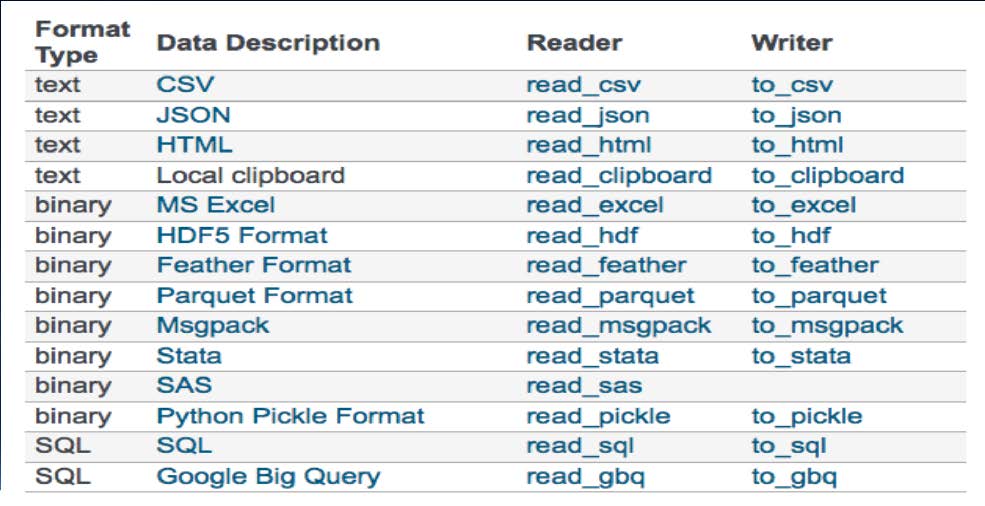
Pandas可以處理的表格形式:原文圖片 01

Pandas I/O讀取和寫入表格

  • 用相應的讀取函式載入表格。CSV 可用 read_csv 取得 DataFrame;encoding 應與來源檔案相符,不要把所有檔案都當成 UTF-8。
  • 必要參數: 檔案名稱
  • encoding:讀寫文字檔時使用的編碼,需與檔案或目標工具相符。
  • DataFrame = read_csv(‘檔案名稱’, encoding=‘utf-8’)
  • 用對應的輸出函式保存 DataFrame;例如 to_csv 輸出 CSV,並依後續用途指定編碼。
  • 必要參數: 檔案名稱
  • encoding:讀寫文字檔時使用的編碼,需與檔案或目標工具相符。
  • 選用參數index(有預設值True): 如果不要把pandas 產生的列編號寫進檔案則要設為False
  • DataFrame.to_csv(‘檔案名稱’, encoding=‘utf-8’, index = False)

Pandas 基本資料

  • 本課程主要使用 Series 與 DataFrame:前者是一維帶標籤的資料,後者是二維表格。
  • DataFrame:包含列(row)與欄(column)的二維資料。
  • Series:一維資料;單獨選取 DataFrame 的一欄,常得到 Series。
  • 依索引選取單一列,也可能得到 Series,實際結果依選取方式而定。

Pandas之操作

以下統一以「列」表示 row、「欄」表示 column。loc 依標籤選取,iloc 依整數位置選取;請先查看索引與欄名,再決定用哪一種。

  1. DataFrame 大小
  • df.shape

  1. 選取單一欄
  • 選取一欄:df["欄名稱"] 或 df.loc[:, "欄名稱"]。df.loc["列標籤"] 則是依標籤選取一列,兩者不能混用。

  1. 選取多個欄
  • 選取多欄:df[["欄名稱1", "欄名稱2"]];也可用 df.loc[:, ["欄名稱1", "欄名稱2"]]。

  1. 依位置選取單一列
  • df.iloc[索引值]

  1. 依位置選取多列
  • 連續列可用 df.iloc[起始位置:終止位置],不包含終止位置;不連續列應以位置清單選取,例如 df.iloc[[0, 2, 4]]。

  1. 同時選取列與欄
  • 可用 df.loc[列標籤, 欄標籤] 或 df.iloc[列位置, 欄位置] 一次表達選取條件,較容易區分標籤與位置。

  1. 頭幾列篩選
  • df.head(索引值)

  1. 尾幾列篩選
  • df.tail(索引值)

  1. 搜尋一個欄位
  • df[‘欄名稱’].str.contains(‘特徵字串’) 作布林判斷

  1. 列過濾
  • 將搜尋一個欄位結果帶入DataFrame

  • df[df[‘欄名稱’].str.contains(‘特徵字串’)]

  1. 刪除欄
  • df.drop([‘欄名稱1’, ‘欄名稱2’, ‘欄名稱3’…], axis = 1)

  1. 刪除列
  • df.drop([索引值1,索引值2,索引值3…], axis = 0)

範例-台灣銀行牌告匯率範例

請參閱台灣銀行牌告匯率實戰練習

beautifulsoup4 套件

  • 安裝beautifulsoup4
    1
    pip install beautifulsoup4 # 安裝BeautifulSoup4

Beautifulsoup4 簡介

  • 可以用來剖析及萃取HTML的內容
  • 解析器會處理輸入文字的編碼;HTTP 回應、解碼後的字串與輸出檔案編碼仍需分開確認,不能單靠解析就假設資料一定正確。
  • from bs4 import BeautifulSoup
  • soup = BeautifulSoup(html, ‘lxml’)

認識網頁格式(HTML檔)

1
2
3
4
5
6
7
8
9
10
11
12
13
14
15
16
17
18
19
20
21
22
23
24
25
26
27
28
29
30
<html>
# head檔頭
<head>

# css樣式
<style>
#title{
color:red;
}
.link{
font-size:20px;
}
</style>

# script腳本
<script>
alert('歡迎光臨勤益科大!');
</script>

</head>

# body內文
<body>
<h2 id="title">勤益科大首頁</h2>
<img src="ncut.png" style="width:50px;height:50px;"></img><p>
<a class="link" href="http://web2.ncut.edu.tw">勤益科大網站</a><p>
<a class="link" href="https://www.google.com">Google</a>
</body>

</html>

網頁的組成

網頁的組成:原文圖片 02

HTML 解析

1
2
3
4
5
6
7
8
9
10
11
12
13
14
15
16
• BeautifulSoup會把網頁形式的文字剖析成一顆DOM tree
• html中的各個標籤會變成DOM中一個節點(元素)
• 元素:<標籤名屬性名=“屬性值”>內容</標籤名>
• 標籤
• <標籤名>內容</標籤名>
• 特殊標籤
• 圖片:<img>內容</img>
• 超連結:<a>內容</a>
• 屬性
• <標籤名屬性名=“屬性值”>內容</標籤名>
• 特殊屬性
• src屬性:<img src="圖片讀取網址">
• href屬性:<a href="連結到的網址">
• 通用屬性
• id屬性: <標籤名id=“屬性值”> ,其中屬性值會對應到CSS中的# 號屬性名
• class屬性: <標籤名class=“屬性值”> ,其中屬性值會對應到CSS中的. 號屬性名

BeautifulSoup Parser

說明 https://www.crummy.com/software/BeautifulSoup/bs4/doc.zh
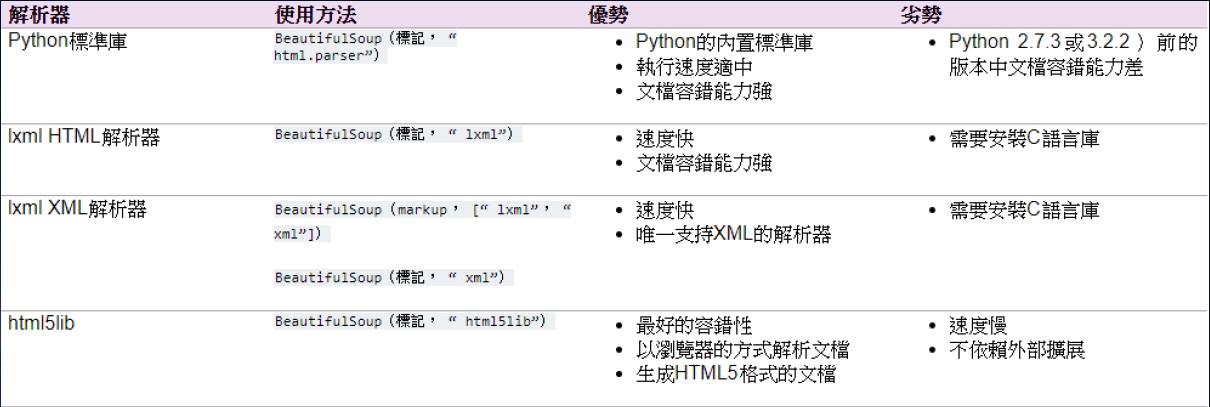
BeautifulSoup Parser:原文圖片 03

CSS(Cascading Style Sheets) Selector

1
2
3
4
5
6
7
8
9
10
11
12
13
14
15
16
17
18
19
20
21
22
23
• 尋找某標籤的元素
• 找第一個符合條件的標籤:#傳回一個標籤
• find(‘標籤名’)
• select_one(‘標籤名’)
• 找所有符合條件的標籤:#傳回一個List
• find_all(‘標籤名’)
• select(‘標籤名’)
• 尋找某標籤某id的元素
• select_one(‘標籤名#id名’)
• find(‘標籤名’, id=‘id名’)
• 尋找某標籤某class的元素
• select_one(‘標籤名.class名’)
• find(‘標籤名’, class_=‘class名’)
• 尋找某標籤的元素中的內容
• select_one(‘標籤名’).text
• 尋找某標籤的元素中的某屬性值
• select_one(‘標籤名’).get(‘屬性名’)
• 尋找所有特定標籤的元素中的內容
• for a in soup.select(‘標籤名’)
• a. text
• 尋找所有特定標籤的元素中的某屬性值
• for a in soup.select(‘標籤名’)
• a.get(‘屬性名’)

re套件正規表達法

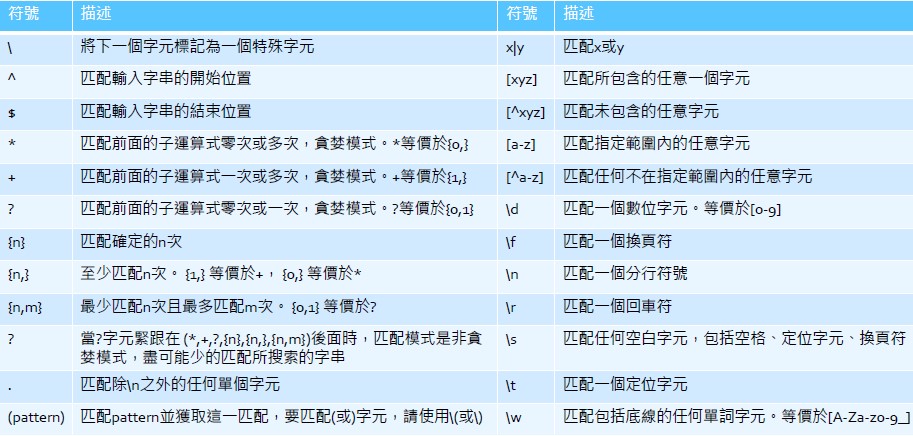
正規表達法符號之意義

正規表達法符號之意義:原文圖片 04

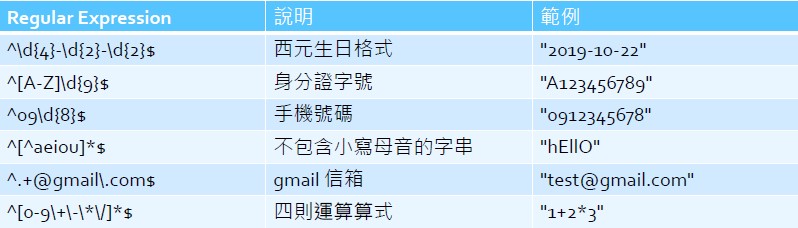
Regular Expression範例

Regular Expression範例:原文圖片 05

re套件簡介

1
2
3
4
5
6
7
8
9
10
11
12
13
14
15
16
17
18
19
# Python 內建 re 套件有Regular Expression函數
# 功能:處理匹配字串
import re

# re.match(‘pattern’,字串)
print(re.match(r'([A‐Z]+(\d+))', '123STR456OIT789'))
# 匹配string 开头,成功傳回Match object, 失败傳回None,只匹配一个。

# re.search(‘pattern’,字串)
print(re.search(r'([A‐Z]+(\d+))', '123STR456OIT789'))
# 在string中进行搜索,成功傳回Match object, 失败傳回None, 只匹配一个。

# re.findall(‘pattern’,字串)
print(re.findall(r'([A‐Z]+(\d+))', '123STR456OIT789'))
# 在string中查找所有 匹配成功的元组, 即用括号括起来的部分。傳回list对象,每个list item是由每个匹配的所 有元组组成的list。

# re.match(‘(pattern)’,字串).groups()
print(re.search(r'([A‐Z]+(\d+))', '123STR456OIT789').groups())
# 如果有匹配成功才可用(pattern)獲取這一匹配成功的元组

requests套件

  • 安裝:
    1
    conda install requests # 安裝requests套件  

GET vs. POST

  • GET: 發送requests,Server 回傳資料
  • POST: 發送requests 並附帶資料,Server 回傳資料

範例-台灣銀行歷史牌告匯率查詢爬取

原始課堂紀錄尚未收錄此範例的完整程式。這裡保留主題與參考網址,不把未完成的練習描述成已實作成果。

範例-蘋果即時新聞

這是 2019 年網站結構下的課堂範例,來源網站與 HTML 可能已改變。閱讀重點是請求、選擇器與內容整理,不能假設原網址與選擇器仍可直接使用。

1.蘋果新聞列表爬取
1
2
3
4
5
6
7
8
9
10
11
12
13
14
15
import requests
res = requests.get('https://tw.appledaily.com/new/realtime')

from bs4 import BeautifulSoup
soup = BeautifulSoup(res.text, 'lxml')

for news in soup.select('li.rtddt'):
title = news.select_one('h1').text
category = news.select_one('h2').text
dt = news.select_one('time').text
link = news.select_one('a').get('href')
print(title)
print(category)
print(dt)
print(link)
2.蘋果新聞內文爬取
1
2
3
4
5
6
7
8
9
10
11
12
13
14
15
import requests
res = requests.get('https://tw.news.appledaily.com/life/realtime/20191018/1650583/')

from bs4 import BeautifulSoup
soup = BeautifulSoup(res.text , 'lxml')

soup.select_one('.ndArticle_margin p').text

soup.select_one('h1').text

print(soup.select_one('h1').text)

soup.select_one('.ndgTag .current').text

soup.select_one('.ndArticle_creat').text

如何使用 requests.get

1
2
3
4
import requests
res = requests.get('https://rate.bot.com.tw/xrt/quote/l6m/JPY')
res
print(res.text)

將研習內容接成自己的流程

先選一個小任務,例如讀取 CSV、篩選欄位並輸出結果,逐步確認輸入與輸出。若使用網頁資料,先查看回應狀態與實際 HTML,再設計解析;資料取得、解析成功與內容正確應分開確認。

參考:Python 流程控制、pandas 索引與選取。